

BusuttilIO
A personal operating system I’m building for myself.
BusuttilIO is the personal operating system I’m building for my own projects and day-to-day admin. There’s an issue tracker, an electronics inventory, a place for 3D files and PCB work, a ferment tracker, health tracking, and a few other bits.
It’s a private app that I keep adding to as I need things. I use it in the browser and through an iPhone app. I thought it would be useful to write a bit about what’s in it and how I’m building it.
The screenshots use made-up data in the app’s real components, so I can show how it works without sharing private records. You can open the images to see them at full size.
Software projects and issues
I keep features, issues and tasks here, along with notes about the project, app versions and releases. It gives me somewhere to put the decisions and test results as well as the list of things to do.
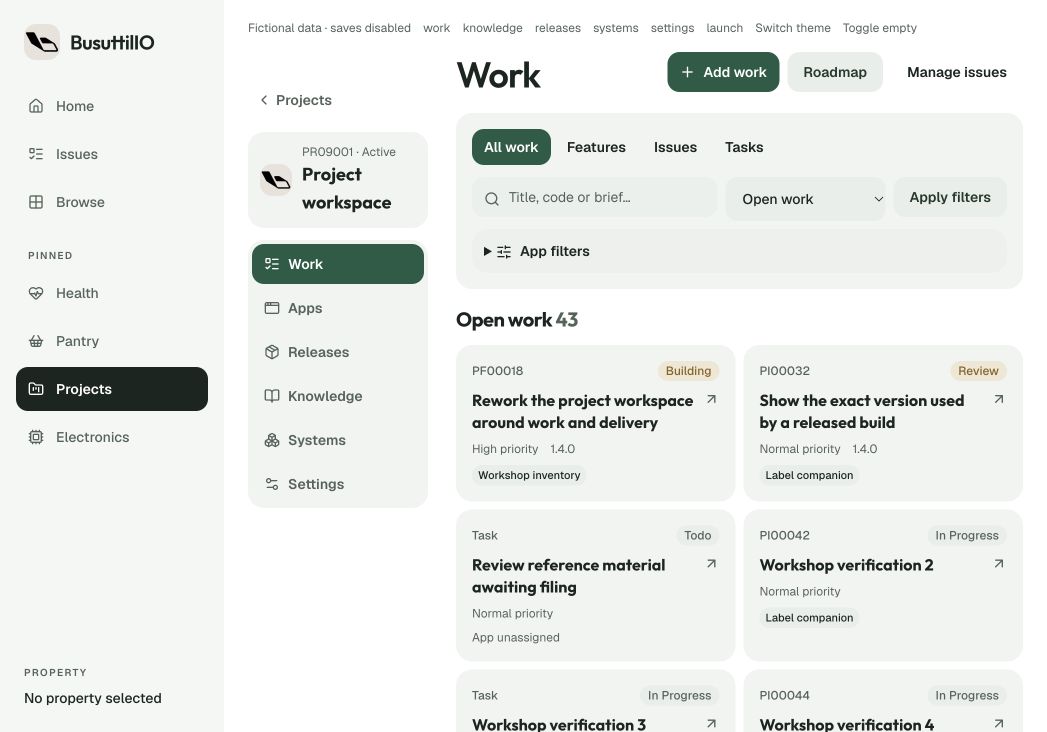
An issue has its description, follow-up notes, status and priority. Work can be associated with an app when a project contains more than one. There’s also a roadmap for the things I’m thinking about doing later.
Project knowledge holds decisions and reference material. A release can collect its scope, checks and destinations, including which revision of a document or screenshot belongs to that version. GitHub integration links the repositories and documentation.
Using Codex with the issue tracker
This is the bit I’m particularly interested in. I’ve built an MCP server so Codex can read issues from BusuttilIO, work on a fix in the relevant app repository, and put notes and screenshots back on the issue for me to review.
It works across the app projects I have access to through the same connection. Each repository points to its BusuttilIO project, so the issue and the code stay associated. I choose what I want it to work on.
- Report something. An app can send a report to its BusuttilIO project, including what went wrong and which screen or version it happened in.
- Read the issue. I choose what I want Codex to work on. It can read the issue, earlier notes and the project’s linked repository through MCP.
- Work on the fix. Codex changes the code in the app’s checkout and runs the relevant checks.
- Add notes. It writes back to the original issue: what changed, what it tested and anything still left to do.
- Attach screenshots. It can attach screenshots or other images of the result to the review note.
- Mark it for review. The issue moves to Review with the note and images. I can check the result or ask for another pass.
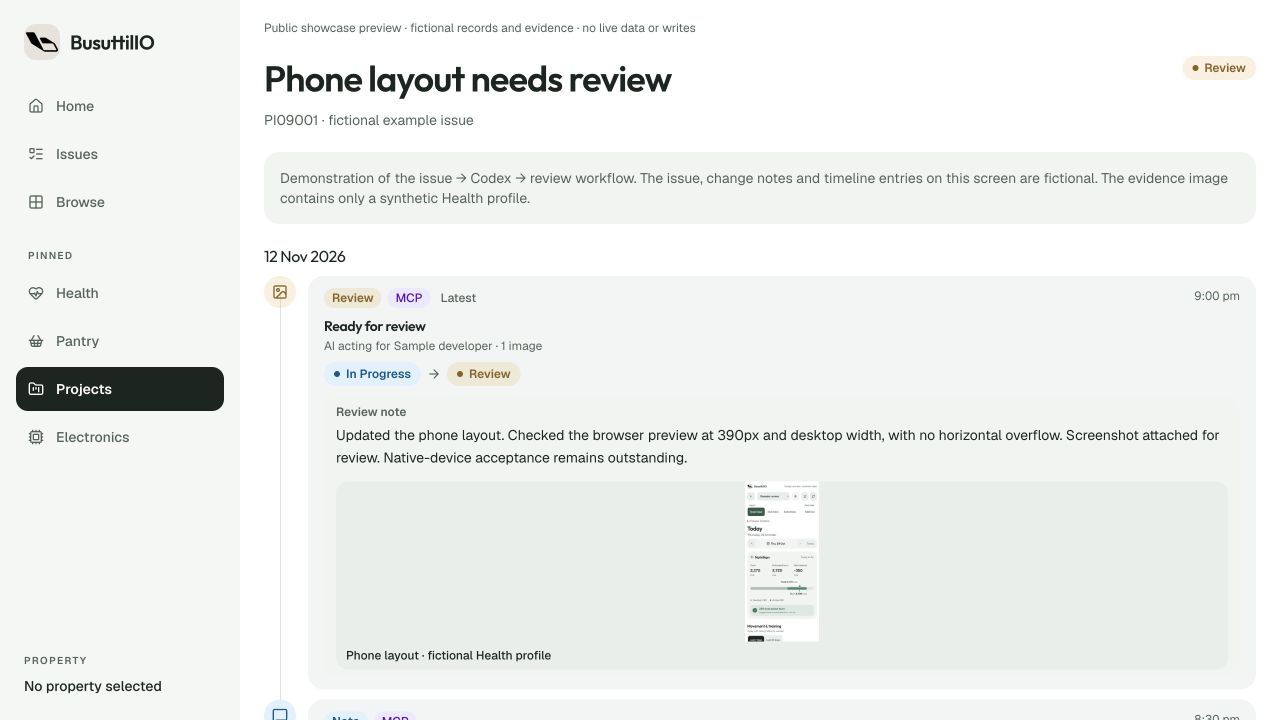
Having the notes and screenshots on the issue means I can see what changed and what was checked without trying to find it in an old chat. The images open at full size, and I can leave a follow-up if something still needs work.
MCP stands for Model Context Protocol. Here it gives Codex a set of tools for reading project context and updating the issue tracker. Access follows the project permissions, and the activity records who made each change and whether it came through MCP or the web app.
Review is where I check the work. A fix can still need testing or deployment before I consider the issue finished.
Electronics inventory
This is for keeping track of components and where I’ve put them. Parts have their specifications, package or footprint, stock lots and storage locations. The aim is to check what I have before buying more or going through the drawers.
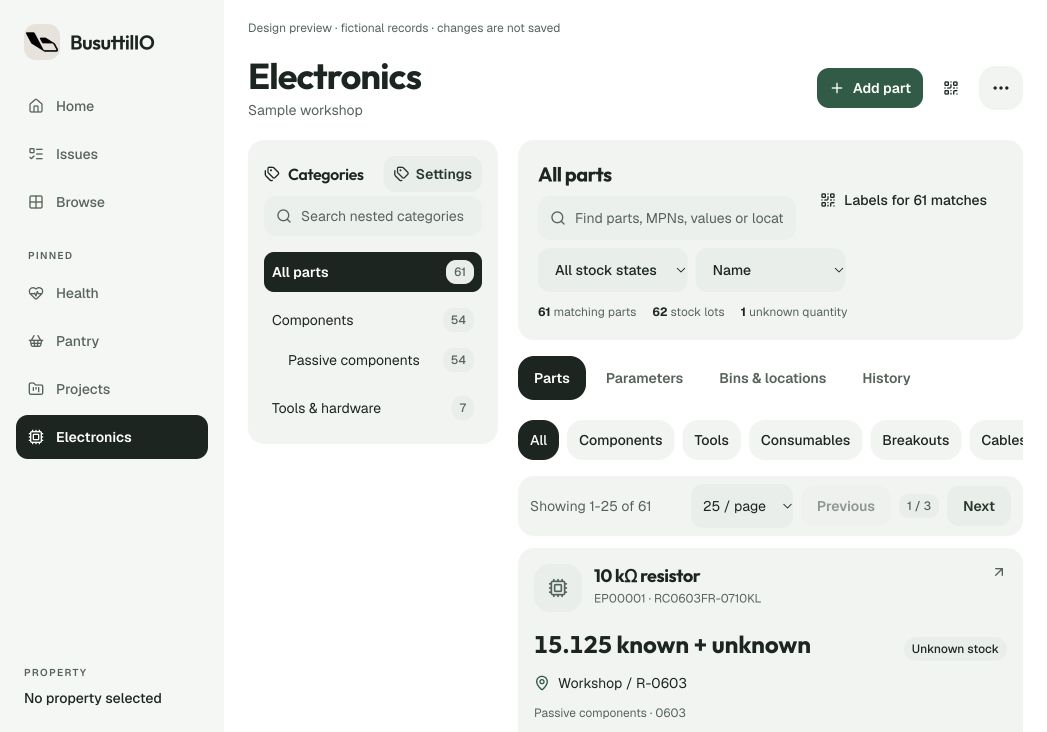
I can organise parts by category, manufacturer and footprint, record quantities and stock movements, and scan a barcode or QR label to get back to a part or bin. It also connects to the label printer and the PCB tools below.
3D models and printing
The 3D Vault is where I organise model files and print projects. A project can have parts, variants and revisions, with the CAD, printable model and slicer files kept against the right revision.
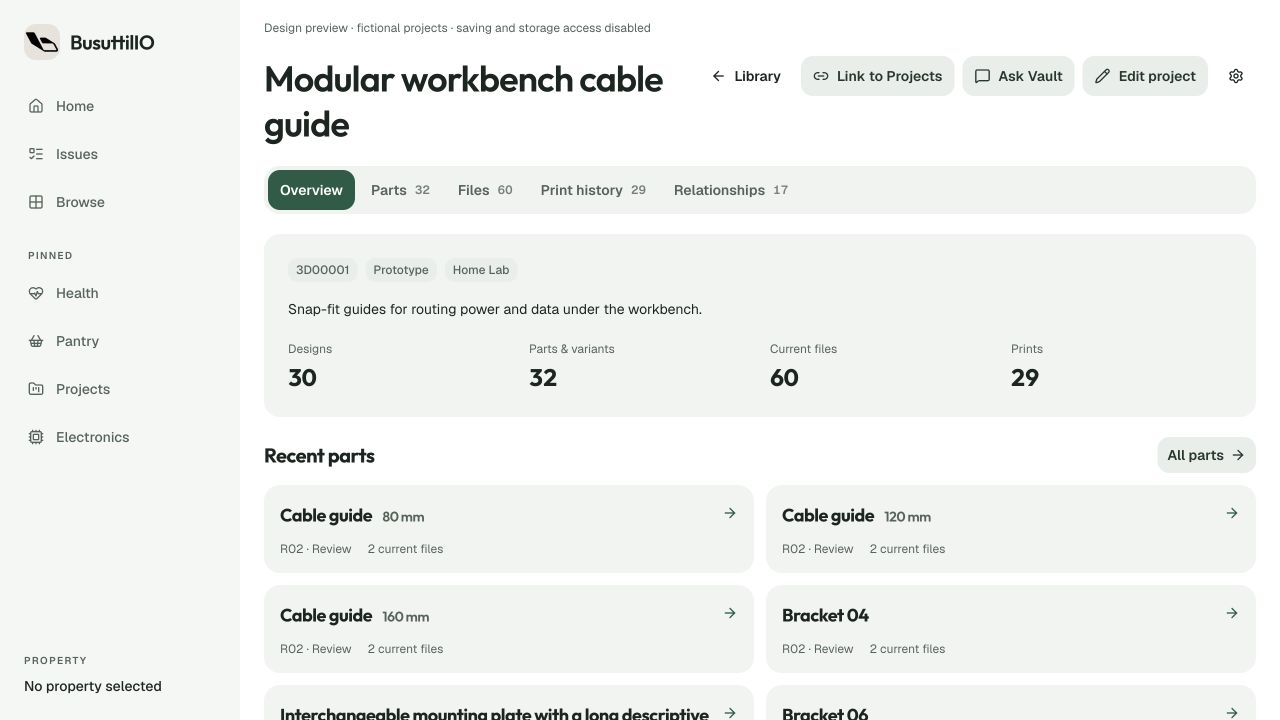
Related parts can share a project while keeping their different sizes and iterations separate. I can add revision notes, mark whether something is ready to print, and keep older files without mixing them up with the current ones. There are import and viewer tools for working with the files.
Print records can point to the exact part, revision and file, with the printer, material, settings, time and result. That gives me somewhere to record whether a part fitted, what failed, and what I changed for the next attempt.
PCB Studio
These are the tools I’m building around KiCad and my electronics work. PCB Studio keeps track of boards, engineering revisions, generated files, design checks and build plans. A KiCad Companion connects the design to the Electronics inventory.
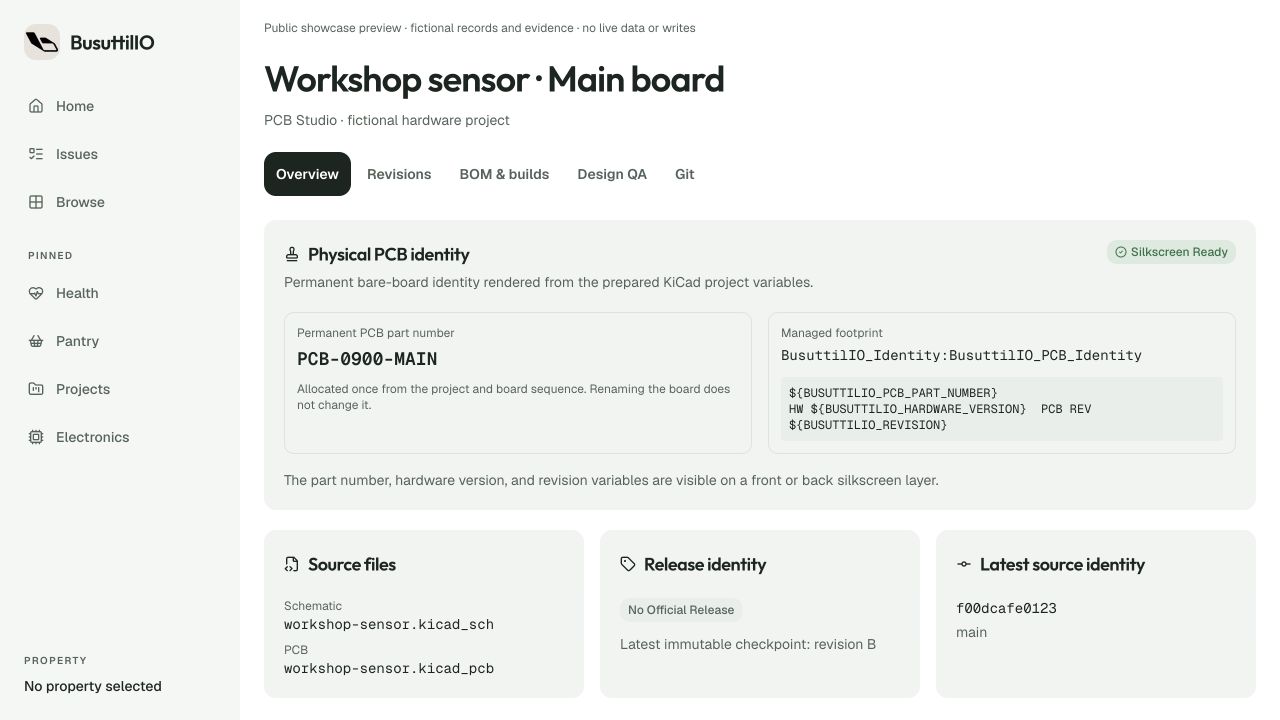
A board keeps a stable part number while its hardware versions and engineering revisions change. Git checkpoints and published snapshots record the source used for a revision. Publishing that checkpoint and choosing an official hardware release are separate steps.
The Companion can link saved schematic components to reusable inventory parts. That lets the bill of materials use the stock records for purchasing, working out how many boards I can build and reserving parts for a build.
Manufacturing outputs, BOM review, design QA and validation stay with the revision and assembly variant. There are viewers for the schematic, board, Gerbers, interactive BOM and 3D model, plus a guide that looks at the project’s current state to suggest what to do next.
Health tracking
I’ve also been building tools for keeping track of activity, measurements and health records. The Garmin integration brings in activity data, with daily views, history, sport statistics and running plans.
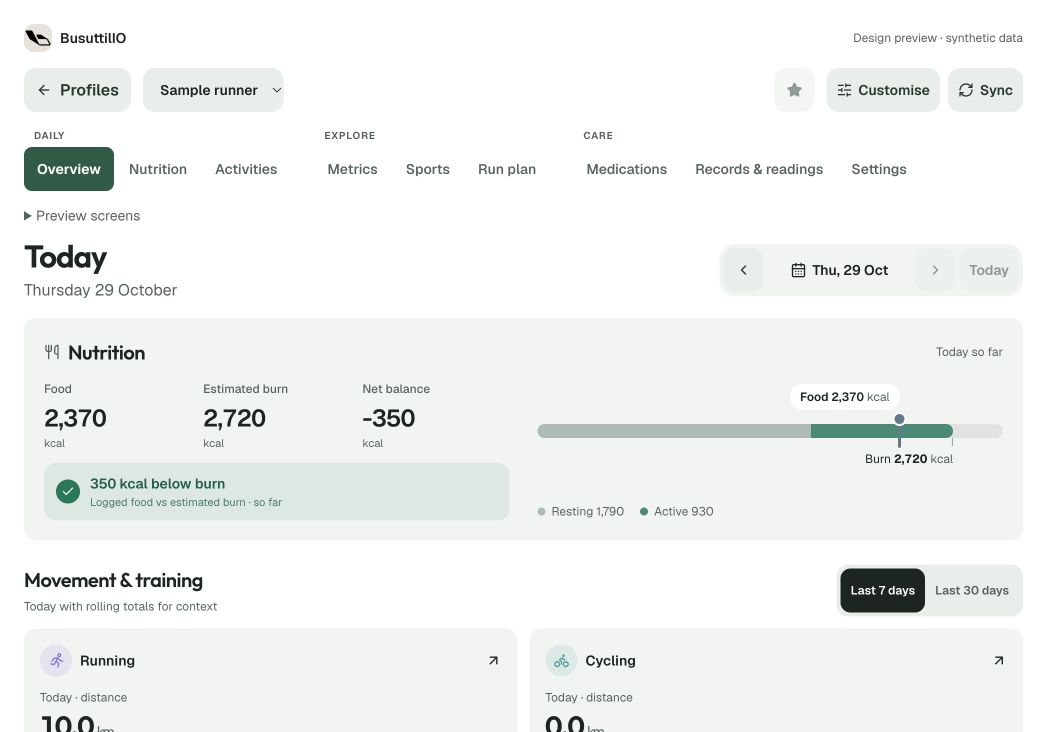
There are daily measurements, energy views, an activity journal and workout planning. The wider Health area also has medication schedules, supplies and documents. I’m keeping the personal details out of this write-up.
A few other bits
Fermentation. Recipes and versions, batches, jars and locations, with check-ins, photos and tasting notes. The tracker covers pickles, kimchi, hot sauce, kombucha and vinegar.
Kitchen. Pantry stock, sourdough, cold brew and storage vessels. There’s somewhere to keep the records around what I’m making as well as what’s in the cupboard.
Documents and notes. An inbox for files, searchable records and project notes, with workers handling imports and OCR.
Labels. Barcode and QR labels for physical things. A local printing bridge sends jobs to the workshop printers.
Books and travel. Reading lists and recaps, trip planning and booking records.
Other admin. Tasks, household inventory, vehicle and finance records, and notes about my network and services. These are other areas I’ve been adding around the same app.
What it’s built with
Most of it is a Next.js web app, with the different tools sharing the same backend and UI components.
- Web application
- Next.js App Router, React & TypeScript. Server actions and HTTP APIs support the workflows, with Tailwind CSS and Radix UI for shared interface elements.
- Data & identity
- Self-hosted Supabase & PostgreSQL. Supabase Auth provides sign-in, with application permissions and database row-level security controlling access to household, module and resource records.
- Background work
- Dedicated workers. Document processing, OCR, imports and integrations run outside the main page flow. Local services connect the app to printing and workshop hardware.
- Hosting
- A self-hosted Node.js application. The Next.js standalone server and Supabase run as separate services on Proxmox-managed infrastructure.
- Development context
- GitHub & the Model Context Protocol (MCP). Repository links, project knowledge and scoped tool access help connect software development with the work tracked in BusuttilIO.
The iPhone app
I’m using Capacitor for the iPhone app. It loads the hosted web interface in an iOS web view and uses the same routing, sign-in and backend.
Native Swift and UIKit code handle the iOS shell and device integration. Capacitor plugins connect camera and barcode scanning, push registration and app-link handoff to the web experience.
A separate SwiftUI and WidgetKit extension provides configurable Garmin metric widgets for the Home and Lock Screens. App Groups and shared Keychain storage support the connection between the app and its widgets.
This image is a phone-sized browser preview of the web interface the app uses. The native app shell and widgets aren’t shown here.
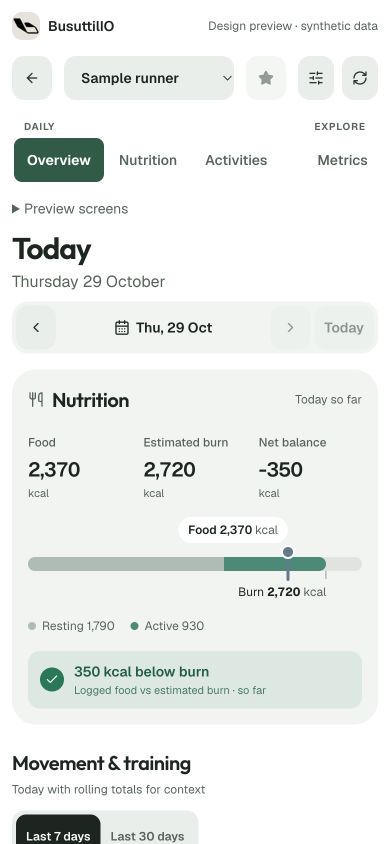
Some areas are further along than others. I’m still changing things as I use them, so this is a look at the project as it stands rather than a finished app.
← Personal projects