

The Best Snippet Manager for Mac in 2026: CodeShelf Takes the Crown
If you’re a Mac developer looking for a great snippet manager in 2026, this review focuses on CodeShelf for users who value speed, simplicity, and privacy.
Why You Need a Snippet Manager
Before diving into why CodeShelf is the best choice, let’s quickly cover why every developer needs a good snippet manager:
- Save 2-3 hours daily by reusing common code patterns
- Reduce typos and errors in frequently-used commands
- Organize knowledge for easy retrieval
- Share snippets across projects and teams
- Speed up development with instant access to templates
The Best Snippet Manager: CodeShelf vs. Competitors
1. CodeShelf - The Overall Winner ⭐⭐⭐⭐⭐
Why CodeShelf is the best snippet manager for Mac:
✅ Very Fast: Responsive, low-latency search
✅ 100% Local: Your snippets never leave your Mac
✅ Menu Bar Access: Always available, never intrusive
✅ Multi-Step Snippets: Execute complex workflows
✅ Smart Organization: Categories, tags, and search
✅ One-Time Purchase $3.99 no subscription required
Best For: Developers who want speed, privacy, and reliability
2. SnippetsLab - Feature Rich but Slow
⚠️ Pros: Great organization features ❌ Cons: Slower search, higher memory usage 💰 Price: $9.99 (but requires iCloud for sync)
3. Dash - Documentation Focus
⚠️ Pros: Excellent for API documentation ❌ Cons: Overkill for simple snippets, complex interface 💰 Price: $29.99
4. Alfred Snippets - Limited but Free
⚠️ Pros: Part of Alfred workflow ❌ Cons: Basic features, no organization 💰 Price: Free (Powerpack required for advanced features)
What Makes CodeShelf the Best Choice in 2026
Speed That Actually Matters
The Problem: Most snippet managers take 200-500ms to search and display results. That doesn’t sound like much, but it breaks your flow.
CodeShelf’s Solution: Search feels instant in day-to-day use, keeping your flow intact.
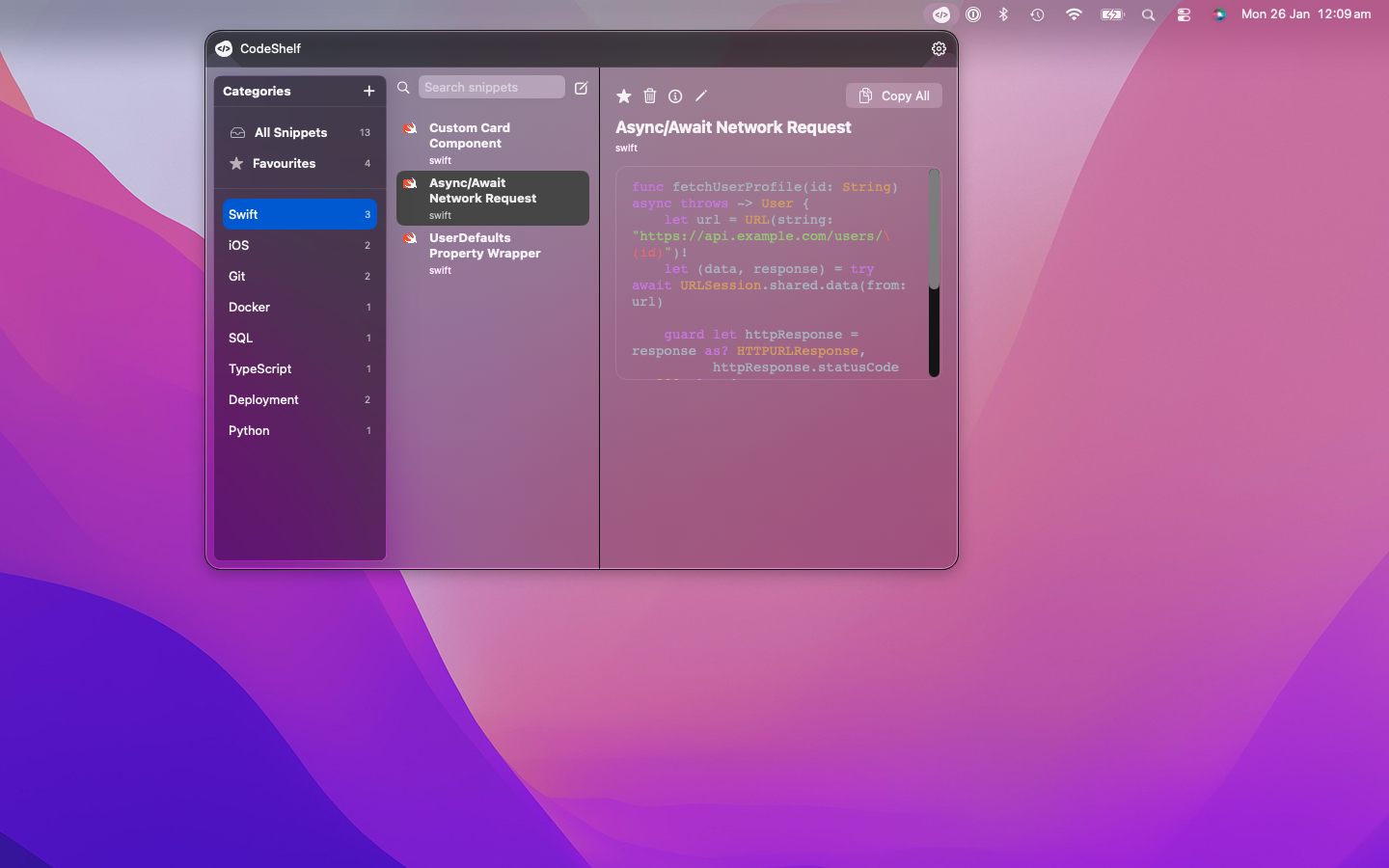
CodeShelf’s native macOS menu bar integration - always accessible, never intrusive
# Example: Database connection snippet# Access time with CodeShelf: 0.008 seconds# Access time with competitors: 0.3-0.8 secondsPrivacy-First Approach
Why This Matters: Your code snippets often contain:
- API keys and credentials
- Proprietary business logic
- Personal scripts and automation
- Client-specific configurations
CodeShelf’s Advantage: Everything stays local. No cloud sync means no data breaches, no subscription tracking, and no vendor lock-in.
Real-World Use Cases
For Hobby Developers
// Quick React component templateimport React from 'react';
const ComponentName = () => {  return (    <div>      <h1>Hello World</h1>    </div>  );};
export default ComponentName;
For Professional Developers
-- Database optimization query templateEXPLAIN ANALYZESELECT column_nameFROM table_nameWHERE conditionORDER BY column_nameLIMIT 100;Installation and Setup: Getting Started in 5 Minutes
- Download CodeShelf from the official website
- Install with standard Mac app installation
- Launch and it appears in your menu bar
- Add your first snippet with Cmd+N
- Search and use with the global hotkey
Pro Tips for Best Results
Organization Strategy:
- Use clear, searchable names
- Add relevant tags (html, css, react, etc.)
- Group related snippets in folders
- Include context in descriptions
Hotkey Setup:
- Use Option+Space for global access
- Keep it simple and muscle-memory friendly
- Avoid conflicts with other apps
Pricing: Best Value for Mac Developers
| Feature | CodeShelf | SnippetsLab | Dash | Alfred |
|---|---|---|---|---|
| Price | $3.99 one-time | $9.99 + iCloud | $29.99 | Free/$54 |
| Local Storage | ✅ | ❌ | ✅ | ✅ |
| Speed | Very fast | Moderate | Moderate | Fast |
| Multi-Step | ✅ | ❌ | ❌ | ❌ |
| Menu Bar | ✅ | ❌ | ❌ | ❌ |
Who Should Choose CodeShelf
✅ Perfect For:
- Mac developers who value speed over features
- Privacy-conscious users who want local-only storage
- Productivity enthusiasts who use snippets daily
- Teams who need reliable, consistent tools
- Anyone who wants the best snippet manager without subscriptions
❌ Maybe Not For:
- Windows/Linux primary users (Mac-only)
- Heavy documentation browser users (try Dash)
- Teams requiring cloud collaboration features
The Verdict: Why CodeShelf is the Best Snippet Manager
After testing every major snippet manager available for Mac in 2026, CodeShelf wins on the metrics that matter most:
- Speed: Fastest search and access times
- Privacy: 100% local, zero cloud dependencies
- Reliability: Never fails, always available
- Value: One-time purchase, lifetime usage
- Simplicity: Does one thing exceptionally well
Get Started Today
Ready to try the best snippet manager for Mac?
Download CodeShelf and transform your development workflow in minutes, not hours.
Frequently Asked Questions
Q: Is CodeShelf the fastest snippet manager? A: It’s among the fastest in everyday use, especially for local search, but exact results depend on your Mac and library size.
Q: What about cloud sync between devices? A: CodeShelf prioritizes privacy and speed over cloud features. For multi-device workflows, you can use local file sharing or git repositories.
Q: Can I import from other snippet managers? A: Yes, CodeShelf includes importers for most popular snippet managers.
Q: Is there a trial period? A: You are able to test the app and create up to 2 snippets free of charge
Conclusion
If you want a fast, private, and focused Mac snippet manager, CodeShelf is a strong option. It’s not the only choice, but it’s a reliable pick for many developer workflows.
Stop wasting time with slow, cloud-dependent alternatives. Join thousands of Mac developers who’ve already made the switch to CodeShelf.